As well as searching on metadata conditions, searches can use filters that are based on the results from other searches.
For example, if you have a search with a filter for hardback products, another search can use a filter to find works that are not in the result of that search. The new search is for Works that do not have a hardback product assigned to them
.
There are two ways in which this can be a very powerful feature for advanced searching: finding metadata that does not meet a particular set of filters, and combining multiple searches into one.
Combining searches
A single search is usually used to find metadata that meets a particular set of conditions, for example active hardbacks with a consumer price of more than USD 100
.
There is sometimes a need for a search that meets multiple conditions: active hardbacks with a consumer price of more than USD 100 *or* more than AUD 150
.
This could be done by exporting three lists of products:
- Products with consumer prices of more than USD 100
- Products with consumer prices of more than AUD 150
- Active hardback products
… and comparing the lists.
However, a search filter can refer to a result of a different search, which allows us to do this more easily by building a search for active hardback products where the product is also in the result either of two other searches: one for prices more than USD 100 and one for prices more than AUD 150.
Here’s how this works
A search for prices more than USD100
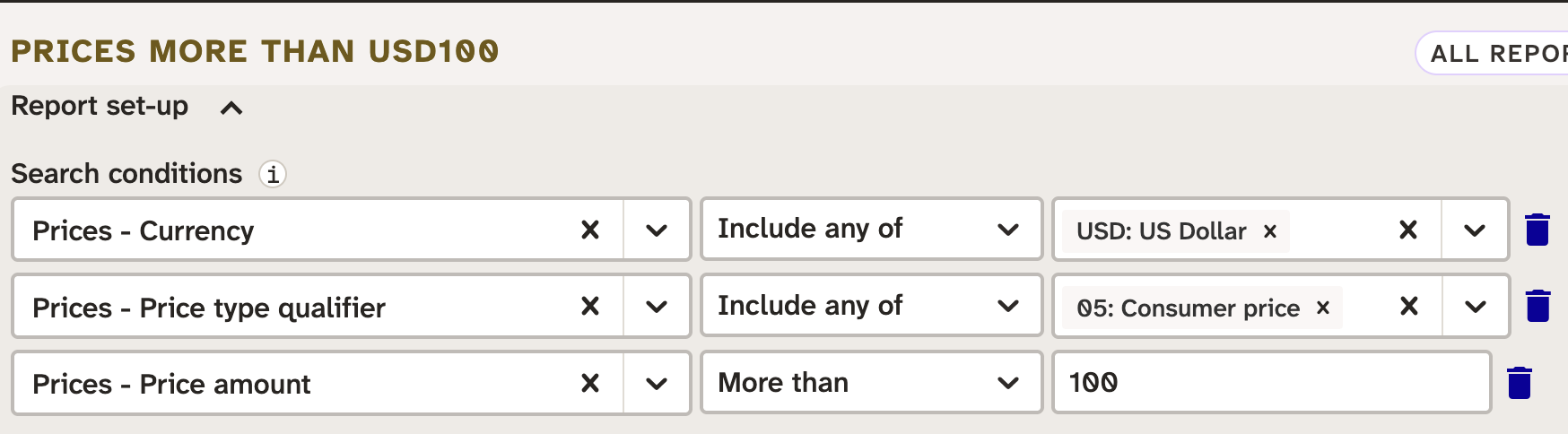
This search filters on price currency, price type qualifier, and price amount to find consumer prices of more than USD 100. The result of this could be a set of prices, or the set of products that have these prices, or the set of works that have products that have these prices – for our purposes the chosen outcome does not matter, because we’ll choose which result set we want to reference in the final search’s filters.
A search for prices more than AUD150
This search uses filters on price currency, price type qualifier, and price amount to find consumer prices of more than AUD 150. Again, the choice of outcome is not relevant.
A search for active hardbacks with prices more than AUD150 or prices more than USD100
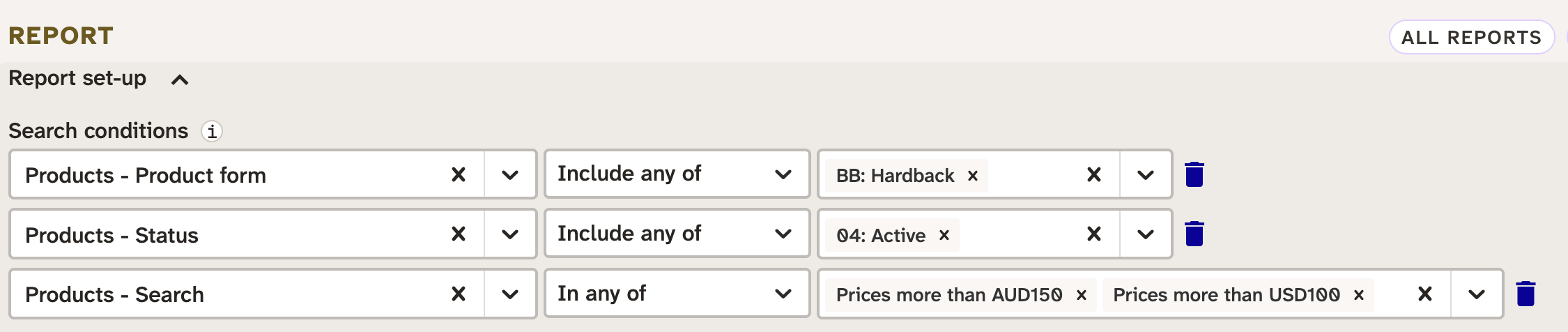
The first two filters are ordinary metadata searches, for active hardback products.
Looking closely at the third filter, we see that it is based on a product search. This means that the filter looks at the products returned from the referenced reports, so here we’re looking at products with a consumer price more than USD 100
and products with a consumer price more than AUD 150
. The filter says in any of
, so the filter matches products that are in either of those search’s results.
Therefore this search is for active hardbacks with a consumer price more than USD100 *or* a consumer price more than AUD 150
.
If we change the third filter to In all of
, we’d get active hardbacks with a consumer price more than USD100 *and* a consumer price more than AUD 150
.
If we change the third filter to Not in any of
, we’d get active hardbacks without a consumer price more than USD100 *or* a consumer price more than AUD 150
.
It’s important to note that this technique does not only apply to finding products with particular combinations of prices. It can also be used to find works that have, or do not have, products with particular characteristics. For example, it is possible to find works that have both out of print hardback products and forthcoming ebook products using a similar method.
Searching for nonexistent data
Ordinary search filters generally find metadata based on the existence of objects. For example, they can find prices, products, or works based on a price having a particular currency code. Even when they are based on a code not having a particular values, such as Prices - currency code is not USD
, they are finding prices that have a particular values, such as GBP
, CAD
, that do not meet the condition.
If you imagine that all of the products in an account have two prices, one denominated in GBP and one in AUD, a search where the currency code is USD would return nothing at all, because no price records match that filter.
However, a search where the currency code is not USD would return all products, because all products have at least one price (in fact they all have two prices) where the currency code is not USD, so all prices match the condition. A search where the currency is not GBP or AUD would not find any results, because no products have a price that is not GBP or AUD.
Suppose that there is a single product in the account that has a GBP price but no AUD price. How do you find that?
You could try running two searches, and exporting the product list results to spreadsheets for comparison. One search to list products where the price currency is GBP, and one search where the price currency is AUD, and the product you’re looking for would appear in the first result set and not the second.
But search filters based on other searches give you a quicker way, by letting you create a search for Price currency is AUD
, and a second search with a condition Products - search not in any of *
Price currency is AUD*
. This is effectively the same as exporting the product list from the Price currency is AUD
search and running another search to say give me products that are not in this list
.